Unlocking Efficiency: Why AI Workflow Automation Matters Today
AI workflow automation is rapidly transforming how businesses operate by streamlining repetitive tasks, improving accuracy, and freeing up human resources for higher-value work. If you want to stay competitive and agile in today’s fast-paced world, understanding how to implement AI-driven automation in your workflows is crucial. This guide dives deep into the step-by-step process that helps you harness the power of AI workflow automation to boost productivity and reduce manual errors.
Understanding the Challenge: Where Traditional Workflows Fail
Many companies struggle with manual processes that are prone to errors, time-consuming, and inefficient. Tasks like data entry, approval chains, customer support ticket routing, and report generation often stall productivity. Without automation, these processes create bottlenecks, increase operational costs, and delay decision-making.
AI workflow automation addresses these pain points by embedding intelligent systems that can learn, predict, and execute tasks with minimal human intervention. The challenge is to carefully identify which processes to automate and how to integrate AI technologies seamlessly.
Preparing for AI Workflow Automation: What You Need to Know First
Identify Core Business Processes
Start by mapping out your current workflows and pinpointing bottlenecks, repetitive tasks, and areas with high error rates. Examples include invoice processing, customer onboarding, or inventory management. This clear understanding forms the foundation for selecting viable candidates for AI Workflow Automation.
Set Clear Objectives
Define what success looks like, whether it’s reducing turnaround time, improving data accuracy, or lowering operational costs. Having measurable goals guides your automation strategy and helps you evaluate ROI later on.
Choose the Right AI Tools and Platforms
Not all AI automation solutions are created equal. Evaluate platforms based on ease of integration, supported functionalities (e.g., natural language processing, predictive analytics, robotic process automation), scalability, and security features. Platforms that offer low-code or no-code options can accelerate deployment and empower non-technical staff.
Also Read: What Is AI Workflow Automation and Why Every Business Needs It
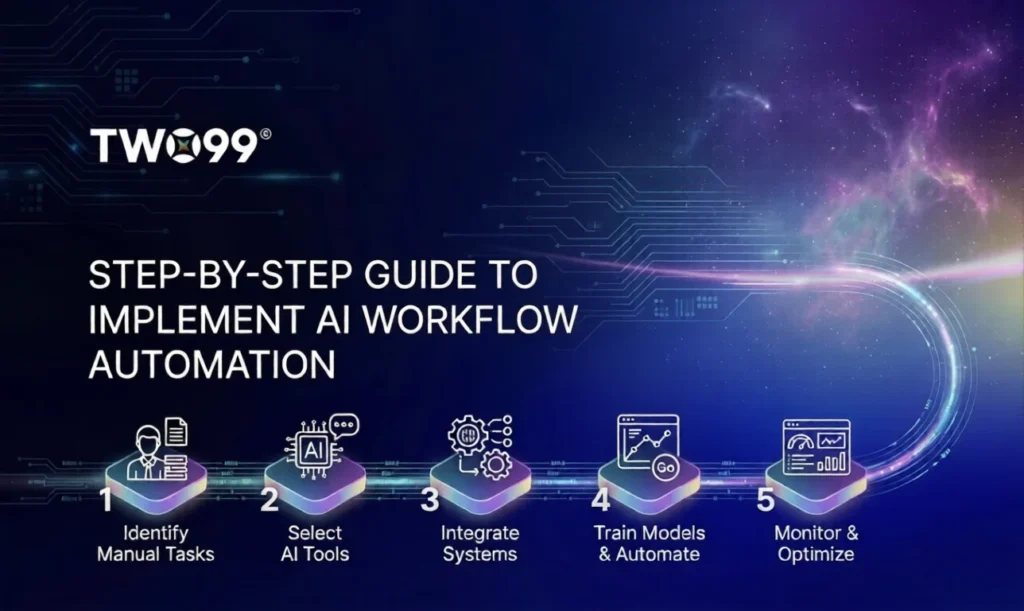
Step-by-Step Implementation of AI Workflow Automation
Step 1: Design the Automated Workflow
Create detailed workflow diagrams showing each task, decision point, and data input/output. Incorporate AI-driven steps where applicable, like using machine learning models for document classification or chatbots for initial customer interaction.
Step 2: Develop or Integrate AI Components
Build or plug in AI models that perform specific tasks. For example, deploy an AI-based OCR system to extract data from invoices automatically or use sentiment analysis to prioritize customer emails. If using third-party AI services, ensure they seamlessly connect with your existing systems.
Step 3: Test the Automation in Controlled Environments
Before full rollout, run pilot tests covering various use cases and exceptions. This helps identify errors, biases in AI outputs, or unforeseen workflow gaps. Iterate quickly to refine and improve accuracy and efficiency.
Step 4: Train Your Team
Successful adoption depends on people. Provide training sessions and resources so employees understand how the AI automation works, how it changes their roles, and what to do when exceptions occur. Highlight benefits such as reduced workload and faster turnaround.
Step 5: Monitor, Measure, and Optimize Continuously
After launching the automated workflow, set up monitoring dashboards tracking key metrics like processing speed, error rates, and user satisfaction. Use this data to make informed improvements and retrain AI models periodically to maintain high performance.
Real-World Applications of AI Workflow Automation
Customer Service Automation
Many businesses implement AI chatbots that handle FAQs, triage requests, and escalate complex issues. This reduces human workload and drastically improves response times.
Finance and Accounting
AI-powered automation processes invoices, matches payments, and generates financial reports faster while minimizing errors, enabling finance teams to focus on strategic analysis.
Human Resources
AI streamlines recruitment by screening resumes, scheduling interviews, and even conducting initial candidate assessments, letting HR teams spend more time on relationship building.
What You Gain with AI Workflow Automation
- Increased operational efficiency and faster task completion
- Improved accuracy by reducing manual errors
- Scalability to handle growing workloads without proportional resource increases
- Enhanced employee satisfaction by offloading mundane tasks
- Actionable insights through data analysis embedded in workflows
Key Takeaways to Drive Your AI Workflow Automation Success
- Start with a clear understanding of your current processes and pain points
- Define concrete objectives to measure automation impact
- Leverage AI tools that match your specific workflow needs and tech environment
- Invest in staff training for smooth user adoption and oversight
- Continuously monitor and optimize to adapt to evolving requirements
Frequently Asked Questions About AI Workflow Automation
How do I know which workflows are best suited for AI automation?
Look for repetitive, rule-based tasks with clear input-output patterns and high error rates. Processes with large volumes that consume considerable time are prime candidates.
Will implementing AI workflow automation replace my employees?
AI is designed to augment human work by handling routine tasks, allowing employees to focus on strategic, creative, and interpersonal activities. It shifts roles rather than eliminates them.
How long does it typically take to implement AI workflow automation?
Implementation time varies depending on complexity but generally ranges from a few weeks for simple automations to several months for advanced AI integrations with multiple systems.
What are common challenges during AI workflow automation deployment?
Data quality issues, employee resistance, integration difficulties, and managing exceptions in workflows commonly arise. Addressing these proactively ensures smoother deployment.
Embark on Your AI Automation Journey Today
AI workflow automation is more than a buzzword—it’s a strategic move to future-proof your business operations. By following a clear, practical step-by-step approach, you can unlock significant efficiency gains and improve overall agility. At LWS, we empower you with insights and tools to implement AI automation seamlessly. Start today and experience the transformation firsthand.
Key Takeaways
AI Workflow Automation helps eliminate repetitive tasks and reduces manual errors
Start by identifying bottlenecks and high-impact processes suitable for automation
Clear objectives are essential to measure ROI and success
Choosing the right AI tools ensures better integration and scalability
A structured implementation approach minimizes risks and improves outcomes
Employee training is crucial for smooth adoption and effective usage
Continuous monitoring and optimization keep workflows efficient and relevant